Roland DIF-AT
[Page under construction - as yet incomplete]
PCB photos, Pinouts, Pin header, Device operation, Connections between subsystems. Notes on firmware structure, Machine language monitor program, DFU, firmware extraction, firmware update script (python)

Brief outline -
I bought this device to repair. They are rare, and interesting. It would not respond any longer or be recognised by host hardware. (it runs in conjunction with host digital mixer / host music production device, translating digital audio formats in real time)
I damaged a lot of traces on the device and gave up on it. However, I learned how to micro-solder and became inspired to continue the repair with reverse engineering techniques. This is my first reverse engineering project, though I have worked on modding and repairing before.
Given the device was already non-responsive (and now damaged further) -
Goals-
- De-solder NOR Flash and read firmware.
- Determine potential corruption of firmware.
- Re-flash firmware onto new NOR flash (if good).
- Determine operation / potential corruption of Xilinx CPLD and/or Alesis OTP? IC - read contents if possible.
- Analyse firmware for anything interesting.
- Determine and examine / analyse hardware architecture.
- Repair traces, replace ICs. Test.
- Collate information, share research and findings.
PCB Photos -
-
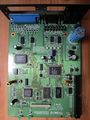 Main board
 -
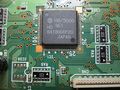 Cpu (not mcu!)
 -
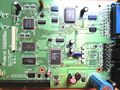 Main board, alt
 -
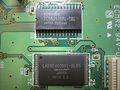 SRAM + NOR Flash (512kb)
 -
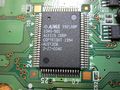 Custom Alesis chip OTP CPLD? GAL?
 -
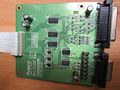 TDIF daughter board
 -
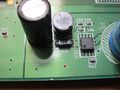 5v power conditioning
 -
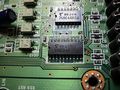 Sync circuitry with optocouplers
 -
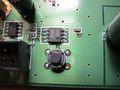 Reset IC and switch
 -
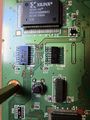 Xilinx CPLD with JTAG pads visible (pin 50, 81 silkscreen)


Device Overview
This is a complex device with a 16 bit CPU, Xilinx 95xx CPLD, Custom Alesis chip (Gate array, PAL, GAL, OTP CPLD?) SRAM, NOR flash 512kb, logic and switching for bus arbitration. BREQ Bus request is a very involved circuit. Also CE# Chip Enable NOR Flash is connected through a complicated muxing circuit. The Alesis custom IC handles the WE# Write Enable to the NOR Flash.
No info could be found on the Alesis chip, searching for the numerous IC markings revealed nothing.
The Device is quite old school. This was built for the early generation of ADAT/TDIF machines, still using physical tape. Thankfully a tape machine is not necessary for operation. The sync requirements of locking digital audio using analogue tape definitely adds complexity to this system.
Device has 2 buttons on the PCB: 1 - RESET, reset circuit and IC 2 - Launch monitor diagnostic mode.
A 50 pin header provides easy access to most address lines and relevant (to operation) CPU/RAM/Flash lines. This will be convenient to run a logic capture during boot and operation later. I beeped out the 50 pin connector - Many pins have multiple connections. Happily; the vias were not tented - this was a long endeavour even with continuity through the vias : ) Below, the findings and some general notes:
-
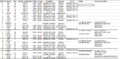 Header pins 1 - 16
 -
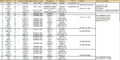 Header pins 16 - 24
 -
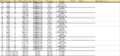 Header pins 15 to 38
 -
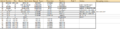 Header pins 38 to 50
 -
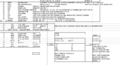 General notes about inferred operation


JTAG/Programming/CPLD
The device has two levels of firmware: NOR Flash and CPLD bitstream. The Xilinx is an older model XC95144 which is programmed over JTAG. However, due to the architecture, bitstream cannot be read out over JTAG (even if unlocked) it has to use vendor specific tools (Platform Cable USB)
JTAG pads are exposed on the PCB as seen in the image above. I could connect to these to read the CPLD. Pretty soon they were pulled off the board, and I had to solder a pin to the leg temporarily to continue reading data. (before I discovered tiny IC clips!)
[Only one device is visible in the JTAG chain, the Xilinx. The CPU, H8300H (Hitachi/Renesas) is not equipped with JTAG at all. Low level CPU operation is done through a bootloader mode]
I connected to the Xilinx XC95144 using Bluetag, OpenOCD and XC3SPROG (open source Xilinx CLI) and was eventually able to read back ID codes and find IR Len etc. I was happy it was responding. It was fun, confusing and difficult to set up all these tools. I set most of them up on a Raspberry Pi as dedicated hacking server so I can connect remotely to the hot mess setup with my laptop, somewhere more comfortable : )
It seems strange to me that, this is a 100 pin CPLD, and only 4 inputs and 4 outputs are used! (solely RBUS data, 8 channels L/R in/out). Counter output from H8300H goes to clock pin of the Xilinx, through an inverter.
-
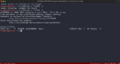 XC3SPROG id read
 -
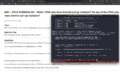 Pullup info from Xilinx
 -
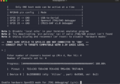 BlueTag correctly reads pins
 -
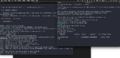 OpenOCD and BlueTag (in BusPirate Mode)


BSDL Scan -
After initial ID code read, I used a BSDL GUI to determine whether the CPLD was actually passing data throughput. Whilst easy to use when running, this tool took a while to set up (I mistakenly compiled it from source in Windows 7 32 bit - somehow missing the fact there there was a package release) After downloading the BSDL language file from Xilinx and setting up the tool with info from the Xilinx datasheet (super confusing naming convention, cells vs physical pins). Scanner could only run with this set up in Extest mode (OS not present nor running) toggling the input pins at a user defined frequency - means the corresponding output logic pulses accordingly.
It was satisfying to see my logic probe light up on the outputs during Extest scanning.
Xilinx CPLD confirmed working - big achievement! (Not tested in actual operation) I'm 99% sure its fine after these tests.
At some point I will get a Xilinx Platform Cable to attempt to read the bitstream for archival purposes. However at this stage I'd had to get a few probes etc and didn't really want to get a Xilinx only device. I've had great luck with unlocked devices so far though, everything I've looked at has been open or level 1 : )

Extract Firmware -
At some point in the repair attempt, I heard a strange flapping sound from the NOR Flash as I moved the device around. ALL of the pins 25 - 48 had detached from the PCB with zero damage to the traces or pins. I surmise that this was the original failure point of the device - dry joints on the Flash chip.
After I desoldered the other half using hot air, I could proceed to read out the contents -
TL48 Programmer-
I used a TL48 programmer with a 48pin TTSOP to read the NOR Flash firmware contents -
In the image below are the settings needed for a good read. The NOR flash is 16 bit wide, but the CPU is reading it in 8 bit mode (8 bit mode pin is tied low). SHARP LH28F400BVE Parallel NOR Flash 512kb. The chip is from the late 1990s as the device is also, turn of the century 2000s.
Although the strings are legible here, this is because the T48 is re-arranging the byte order automatically. The byte order must be swapped (little endian) in order to disassemble the firmware. I found this out after nonsensical strings were seen, without swapping byte order. I tried some 8 bit reads, but this garbled the strings in the T48. It was clear 16 bit wide was correct, but then byte order needed changing. I used a python script to swap the byte order of the entire dumped firmware file.
# swap_bytes.py

input_file = "INTEL_HEX_DIF_AT_LH28F400BVE@TSOP48.bin"
output_file = "INTEL_HEX_DIF_AT_LH28F400BVE@TSOP48_byte_swapped.bin"

with open(input_file, "rb") as f:
    data = f.read()

# Create a new bytearray for swapped data
swapped = bytearray()

# Swap every pair of bytes (i.e., 16-bit words)
for i in range(0, len(data) - 1, 2):
    swapped.append(data[i + 1])  # high byte
    swapped.append(data[i])      # low byte

# If the file has an odd number of bytes, keep the last one
if len(data) % 2 != 0:
    swapped.append(data[-1])

# Write the output
with open(output_file, "wb") as f:
    f.write(swapped)

print(f"✅ Done. Swapped file saved as: {output_file}")
The strings are very interesting indeed. Not just a standard 'version' or 'release date' string - they are command strings!
As this device has no screen, a low level diagnostic routine is inferred from their discovery. Looking closely at the last string or two, I was worried that it might be corrupted as there are some missing letters in the string - (ADAT Sync port di onnected and Dectected rather than Detected).

Binwalk / Binvis -
I slowed down a bit here because I had no idea how to actually load the file I'd dumped to look at it. First I used Binwalk, which I *think* is more suited to SOC work (at least, I think Binwalk is able to find files and systems within bin images, which this firmware does not contain) Anyway Binwalk was able to provide a nice image showing the entropy of the file - low entropy = low chance of corruption or encryption (or possibly I'm defining that the incorrect way around)
I also had a look at Binvis. Binvis makes for a stunning visual representation, regardless of anything else at all. I love it. It was fun to see the strings represented in coloured pixels. Also, very apparent to see in Binvis, are the banks. This firmware is banked and split. This is to facilitate DFU - the device can be firmware updated by the user while still maintaining stable OS. Then switch a flag to change/denote active bank.
This device has two firmware version strings visible in the firmware (at this point the strings are the only thing I've been able to see)
Appears it was already updated in the field to the last OS version (1.022) from I'm not sure if it then wipes the other bank? Possibly, because the other regions are written with FF. However it was still pretty confusing to navigate around later on; BRA from active code to 0xFF region. I'm still not sure: maybe the Alesis CPLD remaps certain memory addresses at run time?


Strings -
Alright we've heard enough about them; here is the list - strings -n 6 INTEL_HEX_DIF_AT_LH28F400BVE@TSOP48_byte_swapped.bin
| mpTp**RolandDIF-AT**z
:MONITOR Ver.1.00z mpVp DIF-AT system program Ver 0.9800 H0123456789ABCDEF System Version = Check Sum = 0123456789ABCDEF Flash memory OK. Flash memory check error RAM test OK. RAM test NG. RS-422 loopback test 1 OK. RS-422 loopback test 1 NG. RS-422 loopback test 2 OK. RS-422 loopback test 2 NG. DA-88 sync loopback test 1 OK. DA-88 sync loopback test 1 NG. DA-88 sync opback test 2 OK. DA-88 sync loopback test 2 NG. ADAT sync loopback test 1 OK. ADAT sync loopback test 1 NG. ADAT sync loopback test 2 OK. ADAT sync loopback test 2 NG. RMDB Fs unstable. Video sync in check NG. NTSC video signal received. PAL video signal received. Video signal checked NG. Different sampling Clock. Check the sampling rate. ADAT Sync port di onnect. DA-88 Sync port disconnect. Dectecte tape end. Tape is write pr 0ected. Tape Ejected. Unformat Tape. !"#$%&'()0123456789@ABCDEFGHIPQRSTUVWXY DIF-AT system program Ver 1.022 |
|||
|---|---|---|---|
I removed all the strings returned which are over n6 but not really strings - and - There are also two blank strings which the above table has optimised away. These seem to have a function, unclear at present.
You can see how, it does look like corruption in some of the strings - gaps in the text.
The **Roland xx looks like a boot banner and is called differently in the firmware. I'm sure that's why it has different start and stop markers. Ditto for the early Version string. Interestingly, the early Version is way at the other end of the addresses in the code. This adds to the DFU / Bank swap theory.
When I finally load the firmware (I still haven't at this point) I spend ages looking for what calls these strings. I find it difficult to navigate but fascinating. It is difficult to navigate any production firmware disassembly I expect. I have no prior experience, but it seems the H8300H is kind of a different level, a bit of an oddity. It's used a lot in Japanese electronics, not so much in Europe I think. I think it's in the Gameboy Advance?
One or two strings can be discovered, which have a different call system to the diagnostic strings (the ones I'm most interested in) especially because I have to repair so many subsystems, ICs, and traces.
I don't know at this point that these diagnostic strings are highly likely to be called by the Monitor Version 1.00, which is highly likely a Machine Language diagnostic tool which must operate over UART.
High Performance Embedded Workshop -
(that's right, I still haven't found Ghidra or Cutter yet)

I downloaded HEW from Renesas, which still keeps this available online. Superannuated Software, total 1998 vibes (though I think its 2003) I love that look though! I managed to load the firmware into it, and yes, it appears to be recognised and loads in just fine. This is a big step, its the first time I'm looking at the disassembly, and it seems like its not badly corrupted (it loads it in) I enter the RAM addresses and sizes and mess about with it for a bit. . .
Ultimately, its not great for RE. It was probably good at the time for developing for the H8, but it's pretty hard to use for RE. I give it up.
There was actually some DOS software that I had a crack at too which apparently loaded H8 firmware but I never got it to open the file.
Ghidra -
I find Ghidra and compile Dev version for some reason I can't recall. I think so I could load third party CPUs.
H8300H is not supported in Ghidra. I find a plugin, https://github.com/shizmob/ghidra-h8-300 and try to compile that and load in Ghidra. It won't compile though - Later I also tried https://github.com/carllom/sleigh-h8 which I also don't get running in Ghidra -
Cutter -

Yay. Cutter was much more useful for what I wanted. Lots of functions were discovered and named with the help of LLMs. (as such, we can't take them as absolutely true, though they are likely to be mostly correct). Things discovered:
Diagnostic Mode -
Firmware checks for input (button push) in early boot. This branches into and launches diagnostic (Monitor) mode. Run Commands not yet discovered.
DFU Routine -
DFU routine and bytes compared to trigger DFU over midi. Firmware is checking for a series of bytes sent from a different machine - these are user operations not part of diagnostic branch. DFU mode trigger (multi-byte pattern): AE E8 6A F7
Show Version Routine -
Show version routine. Again a user operation via a different machine. The User sets a byte sequence using a button combo on a Roland mixer. It sends the bytes to the DIF-AT, and it responds by printing the DIF-AT Version number over midi, on the mixer display screen.
These operations are described below. I found them on Roland's site, and then looked for the relevant part of the firmware which checks for these bytes. Send single byte 0x06 from host to device. That causes the device to: enter Show-Version handler run fcn.ShowVersionSequence() transmit the version bytes to host. return to idle mode
| Updating the DIF-AT from Standard MIDI Files
DIF-AT system software is supplied as 4 files in Standard MIDI File (SMF) format. Tools required: * A product with MIDI In and R-BUS connection, such as the VM-3100Pro (used in this example) * MIDI Sequencer capable of reading and transmitting SMFs with System Exclusive messages * MIDI Cable * R-BUS Cable * System Update files HOW TO UPDATE THE SYSTEM 1) Using R-BUS cable, connect R-BUS terminal of DIF-AT to R-BUS terminal of VM-3100Pro. 2) Using MIDI cable, connect the MIDI OUT of the sequencer to the MIDI IN of the VM-3100Pro. 3) Power on the VM-3100Pro while holding the Channels 6 and 9/10 SELECT buttons. 4) CURSOR to "03:DIF-AT Update," and press ENTER. 5) Load and play the update files from the MIDI Sequencer in order. 6) The ADAT and TASCAM leds will light when the update procedure is completed. 7) Power off and on the VM-3100Pro and the DIF-AT. VERSION CONFIRMATION 1) Using R-BUS cable, connect R-BUS terminal of DIF-AT to R-BUS terminal of VM-3100Pro. 2) Power on the VM-3100Pro while holding the Channels 6 and 9/10 SELECT buttons. 3) CURSOR to "02:DIF-AT Check," and press ENTER. 4) Press F4 to display the system version. 5) Power off and on the VM-3100Pro and the DIF-AT. (c)1999 Roland Corporation U.S. |
|||
|---|---|---|---|
Firmware Update Files -
Also the firmware itself is still available from Roland, as midi update files. These files are sent to the DIF-AT over its RBUS midi port, from an RBUS capable device. (Although classic Roland it seems to be only one digital mixer that has the correct button sequence to do the update / show version) However they are correct in that a user would need an RBUS port to send the midi files, as the DIFAT midi port is two pins on the RBUS connector.
https://www.roland.com/us/support/by_product/dif-at/updates_drivers/ac2a8693-f923-4894-9d8d-da20af3b75ef/ (mac, sea.hqx)
I have not yet performed a Diff of my firmware and the midi updates. I would have to reconstruct them first into a full image. I think my firmware is not corrupted though at this point. I will try and send the DFU command and the payload using a python script instead:
DFU Python Script
With more help from LLM I made a DFU Update python script which first sends the (probable) DFU command, and then sends sequentially all midi files over serial (at midi baud) I compared the received payload to the sent, and it is correct. I have yet to test on the device.
Roland RBUS
Here I will refer to the excellent site of Chris Xiong who made a converter from RBUS>ADAT (but not bi-directional) I bought two from him (though I have been too busy with reversing the official one to use them much).
https://chrisoft.org/blog/post/2024-02-02.html (RBUS technical information)
https://chrisoft.org/blog/post/rbus-adat-m.html (Project page)
I also have another (bi-directional) design from a VSPlanet forum user, an engineer called Bear did a redesign of the later revision of the DIF-AT (full bit depth ADAT) though I haven't built one yet (bare PCB)