
JEOL JSM-6060

Installation and Configuration
JSM-6060
Information on troubleshooting and setting up the SEM hardware
Control Computer
Information on setting up the computer used to run the JEOL software
System Requirements
Hardware:
- PC with PCI slot(s) (>4GB RAM uncecessary)
- AHA-2940 SCSI card to communicate with SEM
Software:
- MS Windows 7 Pro 32 bit[1]
- MS Windows update package since online support no longer exists[2]
- Virtual Floppy Drive[3]
- SCSI Driver
- ASPI Tools[4] or files here if those aren't available.
Software Installation and Configuration
JEOL software was deployed on WinXP or Win95/98 machines so using Windows 7 won't work without some changes.
- All of the EXE's in the JEOL install folder need to be set to run in Compatibility Mode; Windows XP SP3
- If you don't have a capture card, the software will run as long as the FP3D drivers aren't installed.
- You just get a warning message. If they ARE installed the software crashes with no capture card.
Deben Chamberscope
-
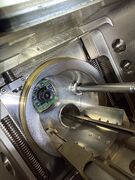 Camera inside chamber door
-
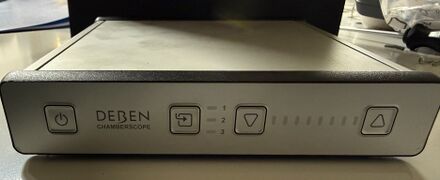 Front of controller, buttons on the right are to control IR LED's on camera
-
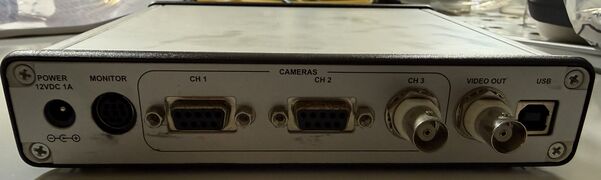 Three video inputs, two using DB9 connectors.
-
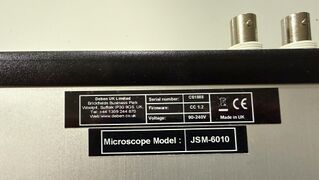 Stickers on the bottom of the unit


This SEM came with a Deben Chamberscope. This is a video camera placed in the SEM chamber and an external controller that allows you to view the sample while the SEM is under vacuum and operating. The control box contains three video inputs, two DB9 and one BNC.
It is unknown at this time if the SEM electron beam preview image was routed into this device and used by the JEOL software, or if this is purely for viewing on an external monitor.
Roughing Vacuum Pump
The vacuum pump that came with this machine is an ULVAC Model G-100DB. It was leaking oil from the front seal which had to be replaced prior to use. The following parts were purchased.
- Front Outer Oil Seal: Misumi P/N AE0772E1
- Deep Groove ball bearing: Misumi P/N 6203
- Front Inner Oil Seal: Misumi P/N AC0743E0
Chiller
A water chiller is needed to cool the oil diffusion pump used in the machine. In this JSM-6060 this is the only component that is water cooled.
Voltage Converter
The JSM-6060 was developed by a Japanese company and runs on the Japanese standard 100V. A converter was purchased to transform the 120V US standard to 100V. The machine can run on 50/60Hz so no additional power conditioning is needed.
Cleaning Supplies
This JSM-6060 was purchased from a surplus company and was very dirty. Even a "clean" SEM may not be clean enough for operation. The following supplies were used to clean the system.
- Everclear (yes, that one)
- Texwipe TX1036
Work Log 2026
September
September 23, 2026
Picked up a couple of computers donated to me by the DFW hacking community to use as the SEM control computer. Installed Windows 7 Pro 64 bit (an EPIC pain) to discover in the end that only 32 bit Windows will work!
September 24, 2026
- Downloaded and installed Windows 7 Pro 32 bit.
- Installed update package, .NET 4.7 and Virtual Floppy Drive.
- VFD is used to load a backup floppy containing the JEOL 6060 backup config files (not original to this machine) during JEOL software installation. Not sure if this step is necessary or if those files can be loaded later.
- Installed JEOL SEM software
- No SCSI or capture cards in the machine so the software hangs upon start and eventually exits
- Installed SCSI card and drivers, verified JEOL SEM appeared in Adaptec list upon boot
- SEM set to ID 0, computer to ID 7
- Installed ASPI drivers so computer can communicate with SEM
- Set all SEM software to start in WinXP SP3 Compatibility Mode
- Software fails to start otherwise
- There is a utility called SEM Manager that runs as a background process when the SEM software is started. This is likely what handles all the memory mapped I/O between the SEM and the PC. Everything else is probably a front-end talking to that "API."
September 25, 2026
- Tested diffusion pump interlock by disconnecting the coolant temperature sensor.
- The machine immediately locked with both the EVAC and VENT lights flashing together and a message on the SEM computer.

- Copied x64dbg to the desktop for analysis of running processes
September 27, 2026 Worked on getting the external joystick/keypad working.
Features within the JEOL software can be enabled and disabled using the Option.exe program on the JEOL installation DISC in the English folder.

After this step you are asked to specify COM ports if the Operation Keyboard and/or Motor Drive Stage options are selected.

September 28, 2026
Performed a metal wetting test using a piece of steel and some water. This is done to check if the metal surface has been cleaned of any contaminants.
- Spray some water on the metal and notice how the water forms
- Clean metal surface
- Repeat spray check
If the water beads up and rolls off, there are still oils or other residue on the metal. If the water appears to flow into the metal, like soaking into a fabric then the metal surface is oil/residue free.
Isopropyl Alcohol (IPA) was tested to clean the surface of the metal, but no change was noticed performing the water test before and after. Using Simple Green on the surface, then wiping it off with IPA resulted in very different water wetting results. The water appeared to soak into the surface of the metal and adhere to it. Rubbing my fingers across the surface of the degreased/uncleaned surfaces a difference could be felt even though the entire thing looked "clean."
This test was performed as a precursor to testing a dry ice blasting machine to clean metal surfaces. Smaller complex shaped components can be cleaned via ultrasonic cleaner. Larger objects or ones that are hard to remove may be able to be cleaned using dry ice blasting.
September 30, 2026
Applied edge trim on sheet metal top sections surrounding SEM chamber. Purchased at O’Reilly Auto Parts

October
October 4, 2026
IT'S ALIVE!!
Received a Wehnelt and filament in the mail yesterday. Installed it in the SEM today and managed to get my first image!

October 5, 2026
Managed to get the Operation Keyboard and Motorized Stage working. The entry on September 27 was the right route. The issue turned out to be the RS232 cables I was using. The PC has a male DB9 and the SEM also has a male DB9. I incorrectly assumed that a crossover cable (NULL Modem) female to female cable would be used. It turned out to just need a straight through female to female DB9 cable. No settings need to be changed within windows at all. Just use the SEM tools to assign the correct COM port from 1-4.
Interestingly, the Keyboard can control all the functions except the motorized stage. The X/Y button on the keyboard will not respond when being pressed. The motorized stage does work if controlled from the Windows software though.
If I reconfigure the system and select the 5-Axis Motorized Drive Stage instead of the Motorized Drive Stage then the keyboard will illuminate the X/Y button when it is pressed, but the motors are no longer functional at all. Not even the windows application can control them.
In the C:\SEM folder there is a MS.EXE and a MS5.EXE file. One of these is loaded when the application starts to control the motorized stage. MS.EXE can control the motors, MS5.EXE does not.
Using Task Manager in Windows I started the JEOL SEM software and after it was fully loaded, I killed the MS5.EXE task and started up MS.EXE. This resulted in the keyboard light still working for X/Y and the motorized stage being controlled by the keyboard and the windows software.
October 6, 2026
Booted the windows computer and renamed the MS5.EXE file to MS5_ORIG.EXE. Renamed MS.EXE to MS5.EXE.
Started the SEM and rebooted the computer so the SCSI interface would identify the SEM.
Now when I start the SEM software everything loads up and the keyboard can control the motors!
October 8, 2026
Worked on the following items:
- Configure and test tvONE 1T-C2-750 DVI/HDMI Scaler.
- This is currently being used as a way to get the live composite video from the SEM overlaid into the SEM software where the magenta square is. The keying feature of this device is used to place the composite video from the SEM into the magenta square. That's the plan at least!
- Contacted Deben (makers of the Chamberscope) and they provided the necessary software and manuals for the device. A composite video capture card was sold with the device which I do not have. It also appears they can use an Imaging Source DFG/USB2PRO capture device. I purchased one of those so the Chamberscope software should be fully functional. From the manual it looks pretty useful.
- Setup a GL.iNet GL-RM10 Remote KVM to use the SEM computer remotely
- Remote Desktop or VNC won't work because the live video isn't part of the Windows interface with this design. If I were to remote into the machine, I would just see the magenta square.
- With this device I will see the output from the tvONE that has the video keyed into the interface
October 9, 2026
- Configured keying on tvONE Scaler and validated a background image from the scaler will show through the keyed area.
- Downloaded CORIO tools and firmware updater which allows for adjusting settings via a GUI instead of the OSD interface.
- Ended up setting a configuration that caused all LED's on 1T-C2-750 to flash on and off basically bricking it, reflashing firmware fixed it.
- Added a low cost composite to USB adapter to test with chamber camera, ended up feeding the SEM live video into it so I could operate the SEM via KVM. SO NICE!
- This will be replaced with a composite to DVI adapter that feeds into the tvONE Scaler that performs the keying.
Being able to load the SEM, then come back into the house and operate it from a couch is very nice. Motorized stage makes that possible!
October 11, 2026
Setup a nicer composite to HDMI/USB adapter to use for the SEM live beam input
- Used a HDMI to DVI cable from the adaptor to the tvONE
- Validated remote access via KVM fully works now with live video feed
Configured the location and size of the live beam video to fit into the JEOL software interface

Cleaned a 25mm square block of aluminum to add to the chamber to increase the specimen height, seen on the right side in the chamber. 10mm distance from beam exit.

October 13, 2026
Documented all connections to the SEM Windows 7 PC before pulling it from the garage to add a second hard drive.
- USB: WiFi Bridge, KVM, Composite Video Adaptor (cheap), Deben Chamberscope, Keyboard/Mouse, Composite Video Adaptor (nice), USB-to-serial to tvONE, USB-to-serial to SEM Motorized Stage
- Ethernet: WiFi Bridge
- Display Port: To tvONE DVI-1
- Serial Port (DB9): To SEM Operation Keyboard
- SCSI: To SEM
- Power: To 120V
Installing Windows 10 32 bit for better support and to install AI tools for device driver work. I want to make a replacement for the FP32.DLL that used to supply the live SEM feed to the JEOL software via a video card with composite capture capability. A composite to USB adaptor does the job just fine for $20 instead of a $800 old capture card.
3D printed some DELL Optiplex 7010 HDD carriers since mine were missing.
Getting hooked up with a sample holder, calibration sample and some carbon tape! Also got a list of great books to read to learn more about sample preparation and SEM cleaning/maintenance.
October 14, 2026
The Imaging Source USB adaptor I ordered arrived. I installed the windows driver software and now the Deben Chamberscope software works!

Worked on the FlashPoint 3D driver replacement this evening
- Setup a shared folder between the SEM PC (Windows 7) and my Mac
- Setup Claude CLI in the shared folder on the Mac
- Had Claude analyze the SEM software, FlashPoint install files and FP3D32.DLL to see if a replacement could be written
- Claude created a stub driver to test functionality. It put a test pattern on the screen and showed a counter of the current frame. This went in place of the normal magenta square that filled the space. The application could be moved around on the screen and the simulated video feed tracked around with the software window seamlessly.

The next step was to build another version that can take a composite to USB adaptor presented as a Windows camera and use that as the video feed to supply to the SEM.
- A utility was created that allows you to select one of the USB cameras available in the system as the SEM live feed
- A .ini file is created in the SEM folder with this information
- The new FP3D32.DLL file is also placed in the SEM folder
Now when the JEOL software starts, it loads the new and improved DLL file and streams the camera into the software. The application can be dragged around and video populates as you would expect. All scan modes and freezing were tested and operated as expected. Overall the whole project only took a few hours!

The end result is the tvONE 1T-C2-750 DVI/HDMI Scaler is no longer needed as this is a more elegant and lower cost solution to the problem.
Additionally, Claude built a SCSI capture utility. By replacing a DLL in the SEM folder we can capture all SCSI traffic between the JEOL software and the windows driver. the local driver in the SEM folder is loaded first (if it exists) before the windows path is searched. So we create our own driver, place it in the SEM folder, and then call the real driver from there effectively performing a man in the middle attack. All traffic is captured to log files for analysis.
October 16, 2026
Installed sample holder with test sample used to aid calibration

Spent time focusing machine and taking images to get this one. A lot of the time was trying to dial in the beam to remove any astigmatism or other artifacts that lead to a blurry image.

Fine tuning SEM will be the next phase of setup to get the full performance.
October 18, 2026 Replaced the clear water lines with black water lines and labeled the in/out with colored zip ties so the hoses could be organized.
-
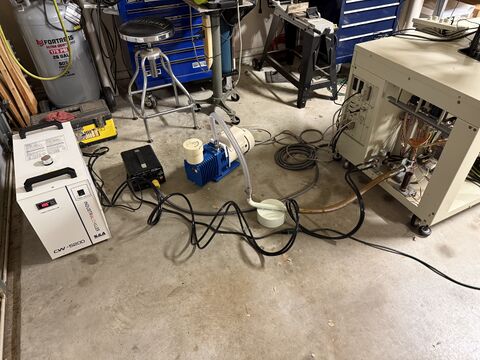 CW-5200 Chiller with black water lines going to SEM
-
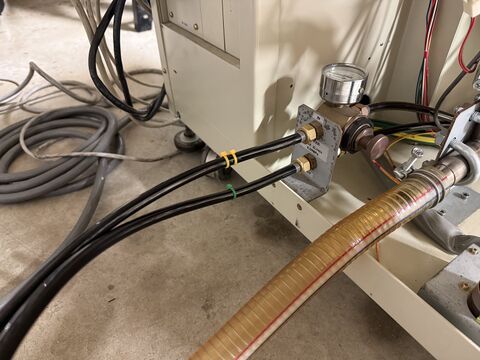 SEM connection point
-
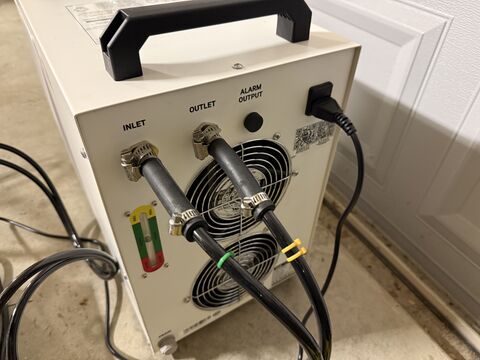 Chiller exit point


- ↑ Internet Archive, Windows 7 ISO download. https://archive.org/download/windows-7-iso-
- ↑ Simplix UpdatePack 7 https://www.majorgeeks.com/mg/getmirror/simplix_updatepack,1.html
- ↑ Virtual floppy drive for Windows NT / 2000 / XP https://vfd.sourceforge.net/
- ↑ ForceASPI Installer https://dvuckovic.com/2004/08/28/forceaspi/