JEOL JSM-6060: Difference between revisions
Added categories |
|||
| (3 intermediate revisions by the same user not shown) | |||
| Line 76: | Line 76: | ||
** Software fails to start otherwise | ** Software fails to start otherwise | ||
* '''There is a utility called SEM Manager that runs as a background process when the SEM software is started.''' This is likely what handles all the memory mapped I/O between the SEM and the PC. Everything else is probably a front-end talking to that "API." | * '''There is a utility called SEM Manager that runs as a background process when the SEM software is started.''' This is likely what handles all the memory mapped I/O between the SEM and the PC. Everything else is probably a front-end talking to that "API." | ||
==== September 25, 2026 ==== | |||
[[File:JEOL JSM-6060 Coolant sensor test 09-25-2026.png|thumb]] | |||
* Tested diffusion pump interlock by disconnecting the coolant temperature sensor. | |||
** The machine immediately locked with both the EVAC and VENT lights flashing together and a message on the SEM computer. | |||
* Copied x64dbg to the desktop for analysis of running processes | |||
[[Category:Scanning Electron Microscope]] | |||
Latest revision as of 20:47, 27 September 2026

Installation and Configuration
JSM-6060
Information on troubleshooting and setting up the SEM hardware
Control Computer
Information on setting up the computer used to run the JEOL software
System Requirements
Hardware:
- PC with PCI slot(s) (>4GB RAM uncecessary)
- AHA-2940 SCSI card to communicate with SEM
Software:
- MS Windows 32 bit (Windows 7 Pro tested) (https://archive.org/download/windows-7-iso-)
- MS Windows update package since online support no longer exists (https://www.majorgeeks.com/mg/getmirror/simplix_updatepack,1.html)
- Virtual Floppy Drive (https://vfd.sourceforge.net/)
- SCSI Driver
- ASPI Tools (https://dvuckovic.com/2004/08/28/forceaspi/) or files here if those aren't available.
Software Installation and Configuration
JEOL software was deployed on WinXP or Win95/98 machines so using Windows 7 won't work without some changes.
- All of the EXE's in the JEOL install folder need to be set to run in Compatibility Mode; Windows XP SP3
- If you don't have a capture card, the software will run as long as the FP3D drivers aren't installed.
- You just get a warning message. If they ARE installed the software crashes with no capture card.
Deben Chamberscope
-
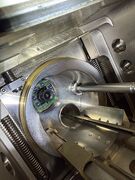 Camera inside chamber door
 -
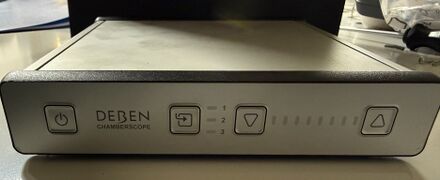 Front of controller, buttons on the right are to control IR LED's on camera
 -
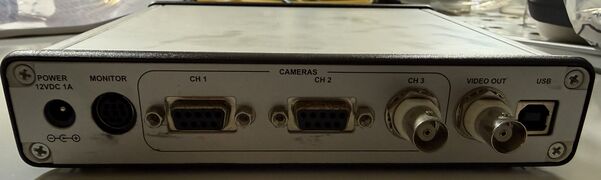 Three video inputs, two using DB9 connectors.
 -
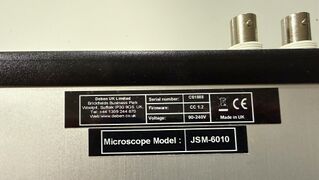 Stickers on the bottom of the unit


This SEM came with a Deben Chamberscope. This is a video camera placed in the SEM chamber and an external controller that allows you to view the sample while the SEM is under vacuum and operating. The control box contains three video inputs, two DB9 and one BNC.
It is unknown at this time if the SEM electron beam preview image was routed into this device and used by the JEOL software, or if this is purely for viewing on an external monitor.
Roughing Vacuum Pump
The vacuum pump that came with this machine is an ULVAC Model G-100DB. It was leaking oil from the front seal which had to be replaced prior to use. The following parts were purchased.
- Front outer seal
- Replacement bearing
- Front inner seal
Chiller
A water chiller is needed to cool the oil diffusion pump used in the machine. In this JSM-6060 this is the only component that is water cooled.
Voltage Converter
The JSM-6060 was developed by a Japanese company and runs on the Japanese standard 100V. A converter was purchased to transform the 120V US standard to 100V. The machine can run on 50/60Hz so no additional power conditioning is needed.
Cleaning Supplies
This JSM-6060 was purchased from a surplus company and was very dirty. Even a "clean" SEM may not be clean enough for operation. The following supplies were used to clean the system.
- Everclear (yes, that one)
- Texwipe TX1036
Work Log
September 23, 2026
Picked up a couple of computers donated to me by the DFW hacking community to use as the SEM control computer. Installed Windows 7 Pro 64 bit (an EPIC pain) to discover in the end that only 32 bit Windows will work!
September 24, 2026
- Downloaded and installed Windows 7 Pro 32 bit.
- Installed update package, .NET 4.7 and Virtual Floppy Drive.
- VFD is used to load a backup floppy containing the JEOL 6060 backup config files (not original to this machine) during JEOL software installation. Not sure if this step is necessary or if those files can be loaded later.
- Installed JEOL SEM software
- No SCSI or capture cards in the machine so the software hangs upon start and eventually exits
- Installed SCSI card and drivers, verified JEOL SEM appeared in Adaptec list upon boot
- SEM set to ID 0, computer to ID 7
- Installed ASPI drivers so computer can communicate with SEM
- Set all SEM software to start in WinXP SP3 Compatibility Mode
- Software fails to start otherwise
- There is a utility called SEM Manager that runs as a background process when the SEM software is started. This is likely what handles all the memory mapped I/O between the SEM and the PC. Everything else is probably a front-end talking to that "API."
September 25, 2026

- Tested diffusion pump interlock by disconnecting the coolant temperature sensor.
- The machine immediately locked with both the EVAC and VENT lights flashing together and a message on the SEM computer.
- Copied x64dbg to the desktop for analysis of running processes